
Integrating CP Plus STQC Cameras with ONVIF Protocols Made Easy

Updated: Jan 9
Currently some of the NVR model series will detect STQC cameras through CP PLUS protocol after updating the firmware. NVR series details mentioned below. Remain NVR series we need to add the STQC cameras through OnVif protocols. For adding the IP camera to remain NVR models, we need to activate the camera through system and manually add in NVR through OnVif protocols.

How to add the STQC cameras through OnVif protocol
CP PLUS IP camera default IP is 192.168.1250 and if its DHCP mode then ip will be the different, for that we can choose the CP Plus IP finder Tool.

There after u can see the IP range list in that tool and from there we can choose the IP and open the web page through ip finder or insert the ip there in web page and open it
Cp plus STQC camera having 2 type interface and this 2-type interface having different type configuration. In both interface NVR configuration will be the same
CP Plus two-way Audio Camera will not support the two-way function through public protocols like Onvif. it will support only through private protocols.

Web interface Type 1 - CP Plus STQC Cameras
Once password configuration completed in cameras, we need to disable some option there in camera (this configuration required only while adding the camera through Onvif Protocols )
1. Need to disable below given options


2. Need to change security mode to compatible mode


After done the given settings in camera we can add the camera in NVR through OnVif Protocols
Web Interface Type 2 - CP Plus STQC Cameras
1. Menu – Securtiy

2. Disable -HTTPS

3. Disable RTSP over TLS

4. Enable OnVif protocols

5. In account create OnVif user and in NVR need to add with the OnVif user

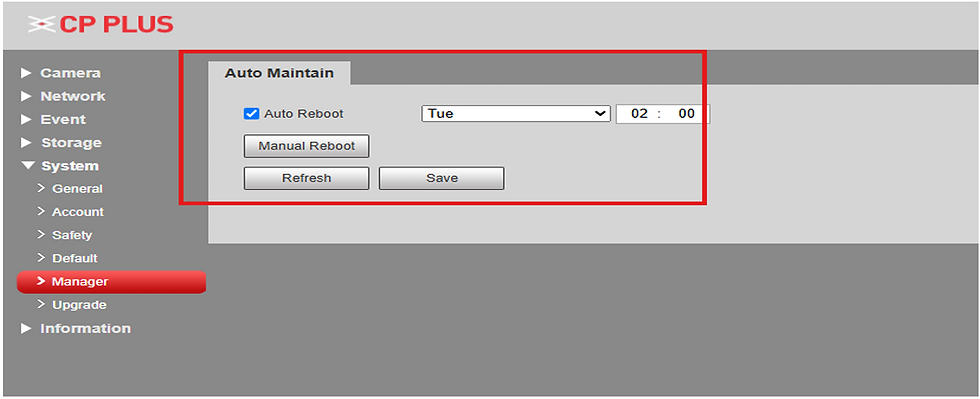
6. Need to disable auto restart option

Infosec Solutions is a top-rated security system installer in Ernakulam
Infosec Solutions is an ISO 9001:2015 certified, top-rated security system installer in Ernakulam, Kerala, providing professional CCTV installation services for homes, offices, apartments, factories, and commercial buildings.

Infosec Solutions is an ISO 9001:2015 certified, top-rated security system installer in Ernakulam, Kerala, providing professional CCTV installation services for homes, offices, apartments, factories, and commercial buildings.
We specialize in CCTV camera installation, IP surveillance systems, intrusion alarms, video door phones (VDP), biometric attendance systems, access control systems, gate automation, boom barriers, home automation, and structured computer networking.
Established in 2013, our experienced technical team delivers reliable security solutions using advanced technology and industry best practices. Whether you need home CCTV installation or a complete commercial security system, Infosec Solutions designs and installs customized systems to meet your safety and operational needs.
CCTV installation in Ernakulam
CCTV camera installation Ernakulam
CCTV installation services in Ernakulam
Security system installer in Ernakulam
CCTV installation company in Ernakulam


28wim làm mình chú ý đến cách hệ thống dẫn mình từ một phạm vi rộng đến lựa chọn hẹp hơn. Mình có thể vào Live Casino trước rồi tìm Roulette, sau đó quay ra và chuyển sang Xổ số. Việc đi xuống từng tầng giúp mình không phải quan sát quá nhiều nội dung cùng lúc. Khi đổi hẳn danh mục, mình lại trở về những mốc chung để xác định hướng mới. Với mình, cách vận hành này giúp cấu trúc dễ hình dung hơn vì mỗi bước đều cho thấy khá rõ mình đang đi sâu trong một nhánh hay đã chuyển sang một khu vực khác.
https://32win8.io/ làm mình quan tâm đến cách giao diện hỗ trợ việc đi sâu rồi quay lại phạm vi rộng. Mình có thể vào Game bài, chọn Phỏm rồi sau đó quay ra để chuyển sang Bắn cá. Khi đi sâu, những nội dung liên quan trở thành trọng tâm nên mình không bị phân tán bởi quá nhiều khu vực khác. Lúc quay ra, các danh mục lớn lại xuất hiện như những mốc để xác định hướng mới. Với mình, nhịp thay đổi này giúp cấu trúc khá dễ hình dung bằng mắt, vì mình luôn nhận biết được khi nào đang ở một lựa chọn cụ thể và khi nào đã trở lại cấp tổng.
https://mm88ak.com/ khiến tôi chú ý đến cách thông tin giao dịch được đặt cạnh một hệ thống nội dung giải trí đa dạng. Tôi thường quan sát vị trí nạp, rút và quản lý tài khoản trước rồi mới chuyển sang các khu vực chính. Trong lúc trải nghiệm, tôi kiểm tra Thể thao, Casino và Xổ số để xem việc quay lại chức năng giao dịch có cần thực hiện nhiều bước không. Sau đó, tôi mở Bắn cá và Nổ hũ nhằm theo dõi khả năng giữ hướng thao tác khi chuyển đổi liên tục. Nếu thông tin giao dịch được phân chia riêng và trạng thái hiển thị dễ hiểu thì tôi có thể kiểm tra đúng khu…
https://luck885.net/ khiến mình chú ý đến cách các phần chính vẫn giữ được sự dễ nhận biết khi có nhiều lựa chọn trên cùng nền tảng. Mình quan sát bố cục chung để hình dung vị trí của các khu trước khi tập trung sâu hơn. Nổ hũ và Bắn cá là hai nhánh mình thường dùng để nhận biết cách nội dung lớn được phân chia, trong khi bảo mật tài khoản nằm ở một phần chức năng riêng. Sự khác biệt về mục đích giúp mình dễ nhớ vị trí của từng khu sau vài lần sử dụng. Càng quen với bố cục, mình càng ít phải tìm lại những nơi thường cần đến trong mỗi lần truy cập.
Luckywin cho mình một góc quan sát khá thực tế khi chức năng hỗ trợ được sử dụng ngay giữa hành trình. Mình chuyển từ Bắn cá Jackpot sang Blackjack rồi tìm đến khu vực liên hệ khi có nội dung cần trao đổi. Phần hỗ trợ được bố trí thành một nhánh riêng nên mình dễ nhận biết thời điểm đã rời các trò. Sau khi xem phần cần thiết, mình sử dụng menu để tiếp tục với Xổ số miền Nam mà không phải trở lại đúng điểm trước đó. Cách kết nối này giúp mình xử lý nhu cầu phát sinh trong phiên nhưng vẫn giữ được những mốc cần thiết để tiếp tục di chuyển trên trang.