
Integrating CP Plus STQC Cameras with ONVIF Protocols Made Easy
- Sooraj AV

- Dec 6, 2025
- 2 min read
Updated: Jan 9
Currently some of the NVR model series will detect STQC cameras through CP PLUS protocol after updating the firmware. NVR series details mentioned below. Remain NVR series we need to add the STQC cameras through OnVif protocols. For adding the IP camera to remain NVR models, we need to activate the camera through system and manually add in NVR through OnVif protocols.

How to add the STQC cameras through OnVif protocol
CP PLUS IP camera default IP is 192.168.1250 and if its DHCP mode then ip will be the different, for that we can choose the CP Plus IP finder Tool.

There after u can see the IP range list in that tool and from there we can choose the IP and open the web page through ip finder or insert the ip there in web page and open it
Cp plus STQC camera having 2 type interface and this 2-type interface having different type configuration. In both interface NVR configuration will be the same
CP Plus two-way Audio Camera will not support the two-way function through public protocols like Onvif. it will support only through private protocols.

Web interface Type 1 - CP Plus STQC Cameras
Once password configuration completed in cameras, we need to disable some option there in camera (this configuration required only while adding the camera through Onvif Protocols )
1. Need to disable below given options


2. Need to change security mode to compatible mode


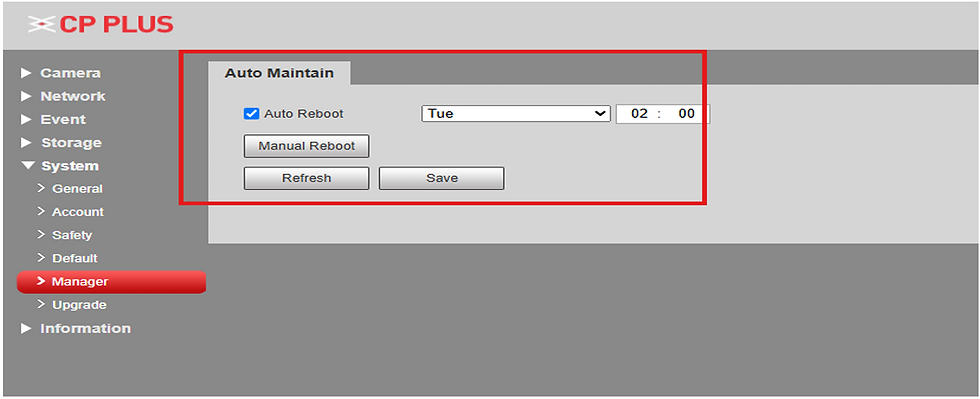
After done the given settings in camera we can add the camera in NVR through OnVif Protocols
Web Interface Type 2 - CP Plus STQC Cameras
1. Menu – Securtiy

2. Disable -HTTPS

3. Disable RTSP over TLS

4. Enable OnVif protocols

5. In account create OnVif user and in NVR need to add with the OnVif user

6. Need to disable auto restart option

Infosec Solutions is a top-rated security system installer in Ernakulam
Infosec Solutions is an ISO 9001:2015 certified, top-rated security system installer in Ernakulam, Kerala, providing professional CCTV installation services for homes, offices, apartments, factories, and commercial buildings.

Infosec Solutions is an ISO 9001:2015 certified, top-rated security system installer in Ernakulam, Kerala, providing professional CCTV installation services for homes, offices, apartments, factories, and commercial buildings.
We specialize in CCTV camera installation, IP surveillance systems, intrusion alarms, video door phones (VDP), biometric attendance systems, access control systems, gate automation, boom barriers, home automation, and structured computer networking.
Established in 2013, our experienced technical team delivers reliable security solutions using advanced technology and industry best practices. Whether you need home CCTV installation or a complete commercial security system, Infosec Solutions designs and installs customized systems to meet your safety and operational needs.
CCTV installation in Ernakulam
CCTV camera installation Ernakulam
CCTV installation services in Ernakulam
Security system installer in Ernakulam
CCTV installation company in Ernakulam


Comments